“Is my laptop worth repairing?” is a question most repair shops answer with a sales pitch. So here is an answer from the opposite direction: a 48-minute video on the Electronics Repair School channel in which a liquid-damaged Acer lands on the bench, the first fault gets found and fixed — and the second one cannot be. The laptop went back to its owner unrepaired, and forty thousand people have watched it happen.
Publishing your own failed repair is a strange thing for a repair business to do. But this failure shows exactly where the line sits between a laptop worth saving and one that isn’t — and how to find out which side yours is on without gambling money on the answer.
One customer, six laptops, and a red sticker
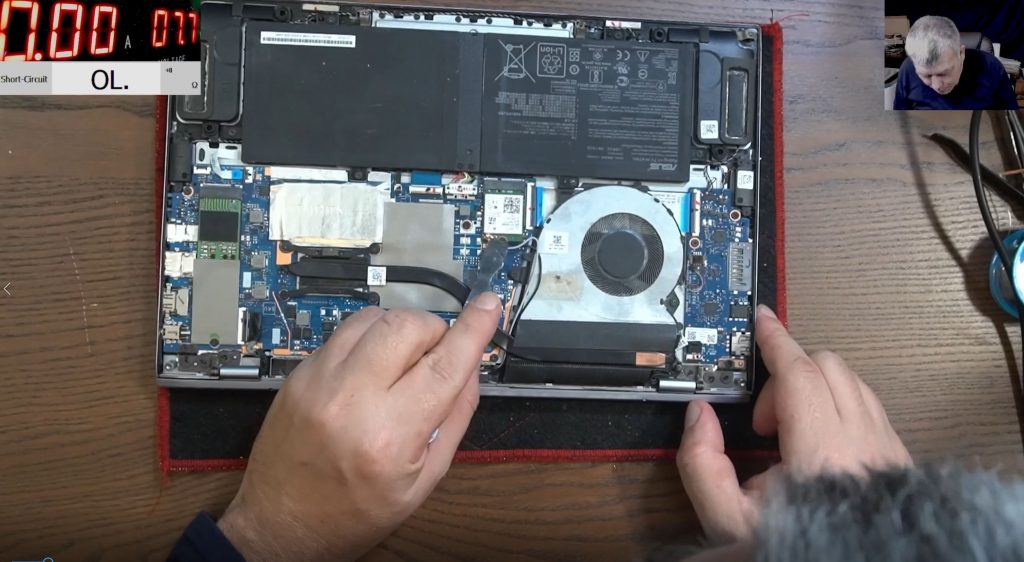
The machine was an i5 Acer, one of roughly six laptops sent in by the same customer — and, like every one of them, somebody had already had a go at fixing it. Inside, the main battery had been left unplugged by whoever came before, and the liquid-damage indicator sticker had turned red.
The first test told the story in one number. With a 19 V charger connected, the laptop drew no current at all. Not a trickle — zero. The 19 volts was arriving at the charging port, yet the main power rail measured nothing on the input capacitor. Somewhere between the socket and everything else, the liquid had cut the power chain.
Under the microscope the top side of the board was clean, which meant the liquid had come in from the back. On the underside there was corrosion on the pins of the BQ charging-management chip, around the CPU power-supply driver, and on the screen connector.
This is where every liquid-damage job forces an honest decision: a board like this can hold a dozen corroded components, and you can spend hours resoldering them one by one and still end up with a dead laptop. Before the first part comes off, the question is already: is it worth the risk?
The first fault: a resistor eaten by something sugary
Tracing the input circuit — charging port, two inductors, first MOSFET, second MOSFET — showed 19 V going into the first MOSFET and nothing coming out of the second. The component in charge of that handover is the BQ chip, and its pins were visibly corroded, so off it came. Underneath, the pads and tracks were fine, and the chip went back on.
The real casualty sat next door: a small resistor crusted in black residue — the spill had almost certainly been sugar-based — that measured completely open, its value unreadable. That one component is liquid damage in miniature: half an hour on a single resistor, with plenty more corrosion where it came from.
The datasheet gave the answer. The resistor fed pin 6 of the BQ chip — the AC-detect input — through a voltage divider specified at 866 kΩ over 133 kΩ. With no 800 kΩ SMD resistor to hand, a donor board carrying a different BQ chip (a BQ25713) gave up its equivalent AC-detect resistor, which measured around 200 kΩ. Fitted anyway — a detect divider needs to cross a threshold, not match a schematic to the ohm — and the board agreed: charger current rose to 30 mA, the detect pin read 4 volts, and the main power rail came back at 19.2 V. The 3.3 V standby supply was alive too, with 3.2 V measured on the BIOS chip’s supply pin.
Halfway in, this looked like a win: the fault that made the laptop appear completely dead was repaired.
The second fault: a hot dot in the middle of the CPU
A board that is genuinely starting draws real current. This one idled at 20 mA — and pressing the power button dropped it to zero. The board was switching itself on the moment the charger went in, and the button was turning it off again. Powered, technically. Alive, no.
Reflowing and cleaning the remaining corroded chips nudged the current to 50 mA. Movement, not life. So the diagnosis moved to a coil-by-coil resistance survey of the power rails, and most read sensibly — 40 Ω here, 33 Ω and 15 Ω there — until the CPU’s own V-core rail: 1.4 Ω.
The same customer had helpfully supplied the context. Sibling boards on the same bench read over 100 Ω on that rail, one of them 192 Ω. At 1.4 Ω, the V-core was shorted — the question was where.
Voltage injection answered it: 0.7 V pushed into the rail at about an amp, thermal camera on the board. A healthy CPU under injection warms broadly across the die. This one showed a single hot dot, dead centre of the CPU. The short wasn’t beside the processor; it was inside it.
There was one last-chance trick left: flowing rosin flux under the CPU with distant hot air at 440 °C — a cleaning method, not a reflow, that has rescued other liquid-damaged boards because dried rosin insulates between pins. The resistance barely moved: 1.1–1.3 Ω, a 15 mA draw at the charger, nothing on screen. A modern laptop CPU is soldered to the motherboard and effectively irreplaceable, and this one was dead. As the video ends: “I’m really sorry I could not fix this one. We cannot fix them all.”
Is my laptop worth repairing? The honest framework
That Acer failed for one precise reason: the damage reached the one component that cannot economically be replaced. That’s the whole decision — laptop repair or replace comes down to what has actually failed, not how dramatic the symptom looks. A “completely dead” laptop with one bad resistor is an easy save; one that lights up but has a shorted CPU is a write-off.
Repair usually makes sense when:
- It’s a single fault on an otherwise sound board. The Acer’s charging circuit — chip off, resistor replaced, rail restored — is exactly this kind of contained, affordable fault.
- Your data matters. A board repair keeps your drive, your files and your installed system untouched, which no replacement laptop does.
- A replacement board is dear or simply unavailable — common for older and premium models, where repair is the only route left.
- The rest of the machine is still good — screen, keyboard and spec all fine, with one fault holding everything hostage.
Repair stops making sense when:
- There are multiple faults stacked up, the way corrosion creeps through a liquid-damaged board — each one fixable, but the hours add up faster than the laptop’s value.
- The main silicon is dead. A shorted CPU or chipset is soldered to the board; when the thermal camera shows that hot dot in the middle of the die, the honest answer is to stop.
- The quote approaches the replacement cost. At that point you should be told to spend the money on a newer machine — and you will be.
Laptop repair cost vs new: the maths
Most common motherboard-level faults — charging circuits like the Acer’s first fault included — cost £90–£180 to repair. GPU/BGA work and multi-fault boards are quoted individually. Against that, a replacement motherboard runs £300–£600+ for the part alone, and for many older models no replacement exists at any price; a whole new laptop of equivalent spec costs more again.
For a single-fault board, repair wins by a wide margin. When the fault list or a dead CPU pushes the laptop repair cost vs new maths the other way, you need a repairer who says so plainly — before your money is spent, not after.
How to find out without gambling
The real answer to “is my laptop worth repairing?” is a diagnosis, not a guess — and the terms here make getting that diagnosis the cheap part. You receive a written quote before any work starts. Diagnosis is free when you go ahead with the repair, the diagnostic time absorbed into the job; if you decline the quote, a small charge covers the inspection time. And if the machine turns out to be unrepairable — as that Acer did — no fix, no fee: you pay nothing for the work, return postage only. Completed repairs carry a 90-day warranty.
Every board is diagnosed and repaired personally by Sorin, who teaches this work — failures included — to nearly half a million subscribers on the Electronics Repair School channel. The workshop is in Grays, Essex, with UK-wide mail-in and 100% online booking, so a specialist opinion doesn’t depend on what’s near you.
Spilled something on your laptop? See how liquid damage repair works →
Post your laptop in from anywhere in the UK →
Related: what laptop motherboard repairs actually cost in the UK.
Worth repairing or not — common questions
Is a liquid-damaged laptop worth repairing?
Sometimes — it depends how far the damage reached. The Acer in this article had a fully repairable charging circuit and a dead CPU on the same board. That’s why liquid damage needs a proper inspection, not a verdict over the phone.
When is a laptop not worth repairing?
When the main silicon is dead — a shorted CPU or chipset soldered to the board — or when corrosion has stacked up so many faults that the hours of work outrun the machine’s value. Then the honest move is to say so and stop — exactly what happened in the video.
How much does laptop repair cost compared with buying new?
Most common motherboard faults cost £90–£180 to repair, while a replacement board is £300–£600+ for the part alone — often unavailable for older models — and a new laptop costs more still. For a single fault, repair is usually the clear winner.
What happens if my laptop turns out to be unrepairable?
No fix, no fee: if the machine can’t be repaired, you pay nothing for the work — return postage only. You also get a written quote before any work starts; diagnosis is free when you go ahead with the repair, and a small charge covers the inspection time if you decline.
Should I repair or replace an old laptop?
Repair when it has a single board-level fault, the data matters, or a replacement board is unavailable — even on an older machine. If the quote approaches the cost of a decent replacement, replace; a straight repairer will tell you that before taking the job.