An Asus laptop not charging and refusing to turn on reads like two faults. On the X540M in this article it was one. The machine arrived on a freezing January morning — minus four outside the workshop — completely dead: no charging light, no power light, no reaction from the power button. Even its two indicator LEDs, tucked away where you would barely notice them, showed nothing at all.
Dead-with-no-lights is the symptom everyone blames on the battery or the charging port. Both were fine here. The 19 volts from the charger made it precisely one component onto the motherboard and stopped — and the component it stopped at turned out not to be broken. That twist is what makes this repair worth walking through.
Charger, port and battery ruled out in minutes
The charger tested healthy first: just over 19 volts on the multimeter, exactly what an Asus barrel charger should deliver. Worth checking before anything else — but on an X540M, a healthy charger only rules out one of several things that can go dark at once.
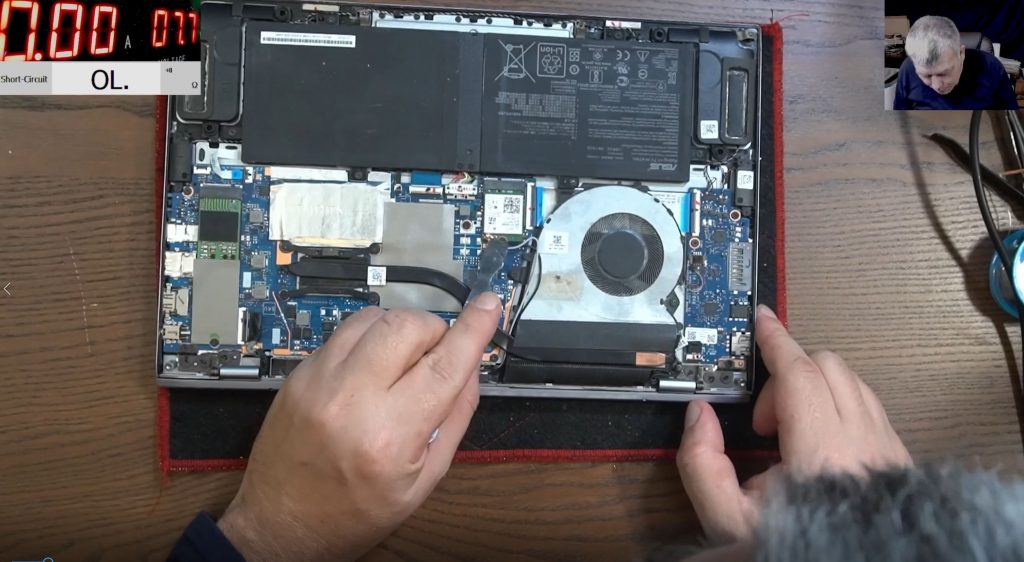
Inside the case — plastic clips, and one screw spinning uselessly in a cracked plastic post, the X540 range never being famous for build quality — the charging port measured 19.3 volts. So the most-accused part in any not-charging story was passing the full charger voltage onto the board.
The X540M carries an internal battery, so the next suspicion was a frozen controller that a battery disconnect would reset. Battery unplugged, charger in: still nothing. Battery back: no change. That rules out a flat battery, and it rules out the whole “hold the power button for thirty seconds” family of fixes.
One last quick check settled it. On this model the power button sits on the keyboard, so the keyboard connector should carry a 3.3 V standby supply. It carried nothing. An Asus laptop with no power anywhere on the board, fed by a healthy charger through a healthy port, is a motherboard fault by definition.
A board you can actually read
Out of the case, the X540M motherboard has one genuinely redeeming feature: you can follow it by eye. The charging input runs through the same basic shape as most laptops’ — port, a MOSFET pair, a current-sense resistor, then out to the rest of the board — and on this model every stage of it sits where you can actually see it: startup chip, CPU, RAM, coils and regulators, all exposed. Easy to follow — which, as the video puts it, does not mean easy to fix.
That input pair with its current sensor is also why you cannot simply inject 19 V at the charging port and expect a dead board to spring to life: the circuit checks what is coming in before it lets anything through.
Under the microscope with the charger connected, the measurements told a very clean story. Input of the first MOSFET: 19.3 V. Output: 3.1 V. After the second MOSFET and the current-sense resistor: the same 3.1 V. The full charger voltage was stopping dead at the very first switch on the board.
The twist: the component blocking the power was healthy
Nineteen volts in, three volts out — the obvious conclusion is a failed MOSFET. One more probe killed that theory. The gate measured 3.1 V, and the output sat at 3.1 V: the MOSFET was doing exactly what its gate told it to do. It was not broken. It was being held off.
That changes the question from “which part failed?” to “why is the board deliberately keeping its own power switch off?”. The gate drive traced back to a small transistor — a protection circuit whose whole job is to pull the gate down and shut the input off when something is wrong. Its input measured nothing. Elsewhere around the circuit: 4.5 V here, 3.6 V there, 0.7 V somewhere else — plausible-looking numbers with nothing to compare them against, because no schematic exists for this board. The trail ran through vias to the far side of the board and went cold. As the video freely admits, with pen and paper you could spend hours drawing the circuit out by hand before cornering the culprit.
Prove the rail is safe, then close the switch
Before deciding anything, one measurement mattered more than all the others: is the main 19 V rail shorted? A bench power supply injected 19 V directly onto the rail beyond the input stage. The current rose briefly as the board actually tried to start, then fell back to zero. No short — a healthy rail, waiting for power it was not being given.
That measurement made the repair decision. This input MOSFET is a switch, nothing more: it does not regulate voltage and it does not manage charging, it simply connects charger to board. With the rail proven clean, the MOSFET came off and a bridge went on — the switch closed permanently.
Charger in: charging light. Power button: power light, picture on the screen, Windows loading. From completely dead to fully working — the same rescue used on a Lenovo Ideapad with a dead power-management chip, though there it could only get the laptop running from the mains; here it finished the job outright.
The video is upfront about the trade-off, and it is worth repeating here. With a schematic, the correct repair is to trace the gate-drive circuit and fix the root cause; bypassing an input protection stage is a judgement call you only earn after proving the rail is not shorted. And no, it does not stop the laptop charging afterwards — a concern Sorin has addressed before, after viewers raised it on an earlier repair using the same fix. Charging is controlled further down the board, not by this switch.
What to do with a dead Asus right now
- All the lights dead together, not one at a time, is the giveaway on this range — charging light, power light and both hidden indicator LEDs share the same rail, so one fault can take the lot out at once.
- Don’t buy a battery or a charging port on guesswork. Both were fine on this X540M, and both get swapped daily on laptops whose real fault sits on the board.
- The charger→port→board order that applies to any brand is in the laptop not charging guide; past the charger check, it’s multimeter-on-the-board work.
Is a cheap Asus even worth repairing?
The X540 range forces this question, because these were never expensive laptops — and the honest answer depends entirely on which repair you’re pricing. A replacement motherboard rarely makes sense on a budget machine; a component-level fix like this one, for a single held-off switch, usually does. Full figures for both are in the motherboard repair cost guide, so you’re deciding with real numbers rather than a guess.
Every quote is written before any work starts, and under no fix, no fee an unrepairable board costs nothing beyond return postage. Every repair carries a 90-day warranty and is done personally by Sorin, booked entirely online with UK-wide mail-in to the Grays, Essex workshop.
Get a written quote before deciding →
Post your Asus in from anywhere in the UK →
Related: Laptop not charging — the full diagnostic guide for every brand.
Asus laptop not charging — common questions
Is an Asus laptop not turning on or charging one fault or two?
Usually one. Both the charging light and the power button depend on the board’s main power rail, so when that rail is down they die together. On this X540M a single held-off MOSFET on the power input caused both symptoms at once.
My Asus has no lights at all — is the battery dead?
No lights points away from the battery, not towards it. This X540M’s internal battery was unplugged and reconnected mid-diagnosis with zero change either way — the machine stayed silent regardless. On a sealed-in battery like this one, that disconnect test is the fastest way to rule it out without opening anything else up.
Could it be the charging port?
Measure before you replace. On this machine the port passed the full 19.3 V from the charger onto the board, ruling it out in one reading. Ports do physically fail — but if the voltage reaches the board, the fault is beyond the port.
Is a budget Asus worth repairing?
It depends which repair you’re comparing it to — a full replacement board rarely pencils out on a budget laptop, but a component-level fix for a single faulty stage usually does. The cost guide has the actual figures for both, so you can decide with real numbers rather than a guess.
Did bridging the MOSFET leave this laptop unable to charge properly?
No. That MOSFET is an on/off switch on the input rail, not a regulator — charging is managed by circuitry further down the board. The rail was also proven short-free with a bench supply before the switch was closed. With a schematic available, tracing the root cause is the better repair, as the video itself says.