A Lenovo laptop not charging usually gets blamed on the charger or the battery. The Ideapad 320 in this article made short work of both theories: fed 19 volts from a bench power supply, it drew exactly zero current — and then booted straight into Windows at a press of the power button, running perfectly on its battery.
A laptop that refuses to accept a single milliamp yet runs happily is telling you precisely where its fault lives. What follows is the real diagnosis of that machine, reading by reading — and it ends somewhere most repair articles never go: at a Lenovo-branded chip with no datasheet, no schematic, and an honest decision about how far a repair should be pushed.
Zero milliamps at the charging port
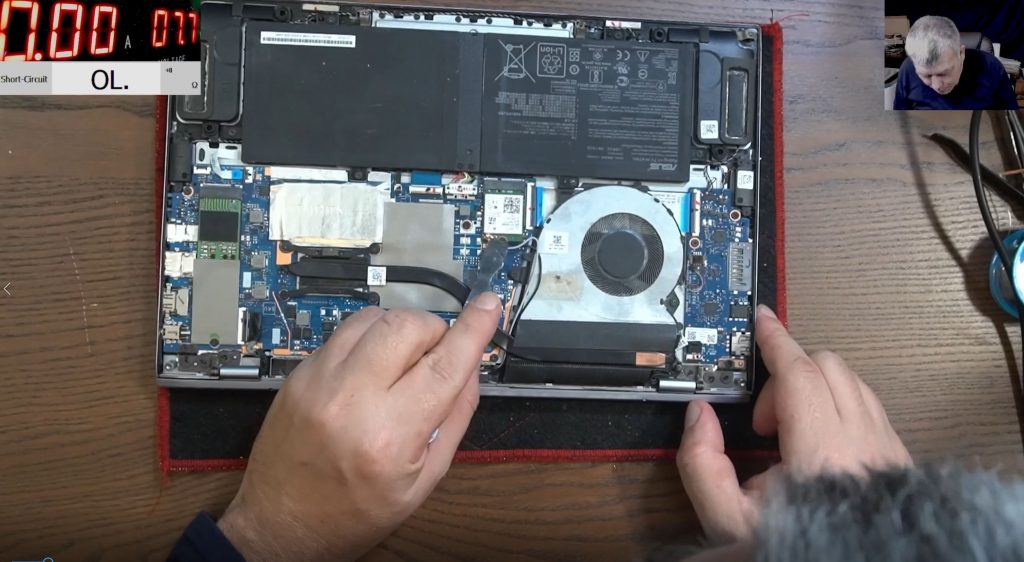
The laptop arrived without its charger, which matters less than you’d think: a bench power supply set to 19 volts stands in for it, and unlike a charger it has a current meter. Ground taken from the HDMI port shell, positive onto the pin of Lenovo’s round connector — and the meter shows exactly how much power the laptop is accepting.
This one accepted nothing. Not a low reading — 0.00 amps, while the red charge light flickered above a circuit passing no current.
That zero is a loud reading. The moment input voltage arrives, even a switched-off laptop draws a small standby current for the always-on supply that waits for the power button. Drawing absolutely nothing means the input stage is electrically severed from the rest of the board.
The twist: the “dead” laptop booted
Pressing the power button, the Ideapad simply came on — power LED lit, Windows loading, everything normal — running on its battery while the input carried on drawing zero.
That one button press reframed the whole job. The startup circuit works, because the laptop starts. The battery holds and delivers charge, because it’s running the machine. What the owner reasonably described as a Lenovo laptop with no power was really a healthy laptop cut off from its charger — and the day the battery ran empty, it would have looked completely dead.
Opening the case added a detail worth noting: the motherboard screws still carried their factory paper seals — the board had never been out — though one case screw was missing, a sign of an earlier, unsuccessful look. Reaching the board on an Ideapad 320 is a full strip-down: the hinge sits over the motherboard, and the RAM is soldered directly to it.
Following 19 volts to a MOSFET that refused to switch
The input stage follows the shape of most laptop charging circuits — port, protection, a MOSFET pair, then a current sensor — and three probes found where it broke down.
With 19 volts on the port, three probes told the story. At the coil: 18.8 volts. At the input of the first MOSFET: 18.8 volts. At its output: nothing.
A MOSFET is a switch, and this one wasn’t closing. The next measurement explained why. It’s an N-channel part, which needs positive voltage on its gate to turn on — and the gate measured zero. Suspicion moves off the MOSFET itself, because a switch can’t close when nothing tells it to, and onto whatever drives that gate.
The Lenovo problem: a chip with no datasheet
The gate drive traced back towards a Lenovo-branded chip marked LV50287 — by every indication the board’s power-management controller. And here the repair hit something specific to Lenovo: searching that part number returns nothing. No datasheet, no pinout, no board schematic. Not one reference.
On most boards this is the routine moment — look the chip up, learn what belongs on each pin, measure your way to a verdict. With proprietary, undocumented silicon there is nothing to measure against and nowhere to buy a replacement new; parts come from donor boards or they don’t come at all. It’s a large part of why an Ideapad charging fault can be harder than the equivalent HP or Dell one.
The pragmatic fix — and exactly where it stopped
With no gate drive to restore, the working option was to remove the first MOSFET and bridge across it, letting the input voltage pass straight through — the same fix that has saved other dead boards on this bench. On some boards that would be reckless. Here it was a measured risk: the main rail was already proven healthy — the laptop ran — so nothing downstream was shorted, and the fuse, the second MOSFET and the current sensor all stayed in circuit as protection.
It worked, to a point. With the bridge in place, the main power rail sat at 18.8 volts and the laptop ran from the mains supply, drawing around half an amp like any working machine.
Charging was another story. Switched off and connected, the laptop drew 10 milliamps — a meaningless trickle. The battery was ruled out directly: it measured 8.4 volts, exactly right for a two-cell pack, and accepted 1.7 to 2 amps when charged straight from the bench supply. Windows, meanwhile, sat showing the charging icon while next to nothing flowed — and raising the input to 20 volts changed nothing either.
The verdict follows from the evidence: the same dead LV50287 that stopped driving the input MOSFET also controls the battery-charging circuit — the coil and pair of MOSFETs beside the battery connector. Bridging restored one of its jobs by brute force; the other can’t be bridged. Finishing the repair properly means a replacement chip from a donor board, fitted with no schematic to check a single voltage against.
What this means if your Lenovo laptop won’t charge
If you’ve searched “Lenovo Ideapad not charging”, there’s a fair chance your machine is showing a version of this same pattern — and you can read a lot from the outside:
- Runs on battery but won’t charge? The battery is probably fine. The fault lives between the charging port and the board’s power rails, exactly as it did here.
- Windows says “plugged in, charging”? Treat it with suspicion. This machine showed the charging icon while drawing 10 milliamps. The operating system reports what the circuit claims, not what the current does.
- Already tried another charger? Most people have by the time a laptop reaches a bench, which is exactly why the charger is so rarely the answer at this stage.
- Tempted to buy a new battery? Not on this symptom. This pack sat at a perfect 8.4 volts and took a healthy charge directly; a new one would have changed nothing.
- Completely dead instead? A broken charge path turns into “Lenovo laptop no power” the day the battery empties. It’s the same fault, one flat battery later.
Beyond those checks it’s multimeter work on the board. The step-by-step ladder that applies to any make — charger, battery, port, board, in that order — is covered in the laptop not charging guide; this post is the Lenovo-specific deep end of it.
Repairable, part-repairable — and the honest difference
Not every board fault ends with a perfect machine, and this job shows why the quoting process matters more than any promise.
Most common motherboard faults — shorted rails, failed standard MOSFETs, damaged charging ports — fall in the £90–£180 range. A fault inside an undocumented proprietary chip is different: it’s quoted individually once diagnosed, because it can depend on donor-board parts. What rarely makes sense is swapping the whole motherboard at £300–£600+ for the part alone — when one can be found at all for an older Ideapad.
The process is built for exactly this kind of uncertainty. Diagnosis is free when you go ahead with the repair, with the time absorbed into the job; if you decline the quote, a small charge covers the inspection time. Under no fix, no fee, a board that genuinely can’t be repaired costs you nothing beyond return postage. Every quote is written before any work starts, completed repairs carry a 90-day warranty, and booking is 100% online with UK-wide mail-in to the Grays, Essex workshop. Every board is diagnosed and repaired personally by Sorin, who teaches this exact diagnosis to nearly half a million subscribers on the Electronics Repair School YouTube channel — this Ideapad’s repair was filmed for it.
See how a fault with no schematic still gets found →
Post your Lenovo in from anywhere in the UK →
Lenovo laptop not charging — common questions
Why does Windows say “plugged in, charging” when my Lenovo isn’t charging?
Windows reports what the charging circuit claims, not what actually flows. The Ideapad 320 in this article displayed the charging icon while drawing 10 milliamps — effectively nothing. If the percentage never rises, believe the percentage, not the icon.
My Lenovo Ideapad runs on battery but won’t charge — is the battery dead?
Almost certainly not. A battery that can run the laptop is holding and delivering charge. This pack measured 8.4 volts — exactly right for two cells — and accepted 1.7 amps when charged directly. The fault was in the board’s charging circuit, not the battery.
I’ve already tried a second charger and my Ideapad still won’t charge — what next?
Then the charger was never the issue. This Ideapad drew zero current from a known-good 19-volt supply — the test that matters once a second charger is ruled out — and that places the fault inside the machine, on the board’s input circuit.
Why are some Lenovo charging faults harder to repair than other brands?
Because of parts like the LV50287 power-management chip on this board: Lenovo-branded, with no public datasheet, no schematic and no supply of new chips. The diagnosis still reaches a verdict, but the repair can depend on donor boards rather than off-the-shelf components.
Is a laptop that only works plugged in worth repairing?
Often, yes — it depends on what the diagnosis finds, which is why a written quote comes before any work. This Ideapad went from accepting zero current to running from the mains again; completing the charging side needed a donor part, and that’s a decision the owner makes with the findings in front of them, not after a bill.