There’s a tell on a Dell laptop not charging that most people never notice: the small indicator light built into the charger itself. Plug the charger into the Latitude E5250 in this article and that light went out — instantly, every time. Pull the plug back out and the light returned.
That one observation does most of the diagnosis before the case is even open. The charger was healthy — 19.9 volts on the multimeter — but the moment it connected to the laptop, something on the motherboard dragged its output straight to ground and the charger shut itself down in self-protection. What follows is the hunt for that something: a real 83-minute board repair on a business Latitude, measurement by measurement.
A healthy charger that switches itself off
The charger is always the first test, because it’s the cheapest possible answer. Multimeter on DC volts, probes on the barrel: 19.9 V, comfortably healthy for a Dell charger.
Then the genuinely useful part. Dell puts a light on the charger, and that light died the instant the barrel went into the laptop. A charger only behaves like that when its output is being pulled down hard — a dead short. So the fault had a name before the case was even open: a shorted main 19 V power rail, the most common fault on a dead laptop board. Normally it’s also one of the quicker ones to put right. This machine had other plans.
2.3 amps into a dead machine
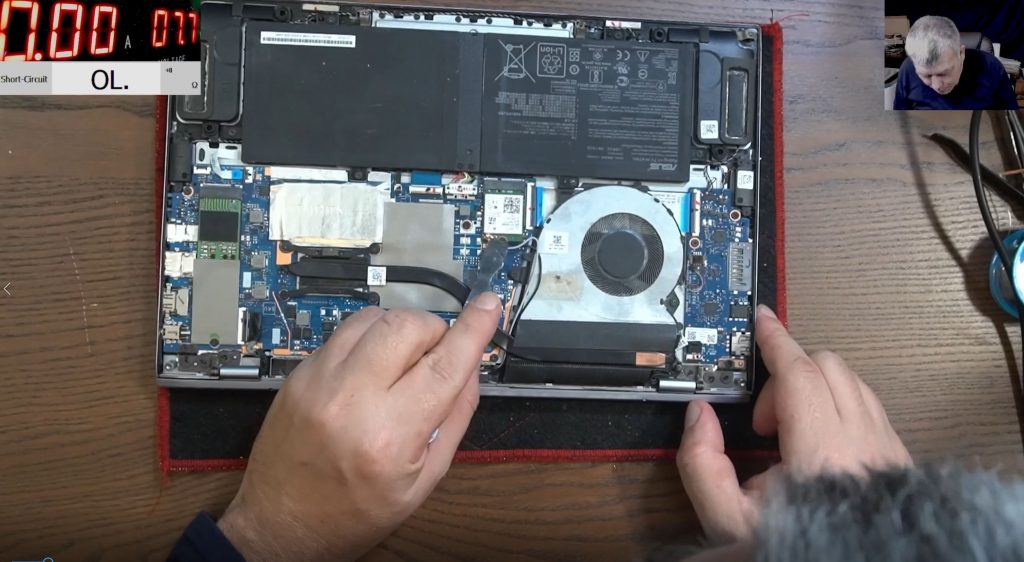
A bench power supply took the charger’s place, set to 19 volts so the current could be watched. The board pulled 2.3 amps while the voltage collapsed to nearly zero — current without voltage, the signature of a short to ground.
The first suspect was the charging port, because it’s the cheapest fix on the list. The port came off, the rail was probed again — still shorted. Whatever was dragging the rail down lived on the motherboard itself.
One more clue: the screws holding the fan were missing — this board had already defeated someone before it reached this bench.
The E5250 fights back
On most laptops the motherboard is a bottom-cover-off job. Not this one. To reach the board, the keyboard has to come out first, then a frame held by hidden screws — and because one hinge sits directly over the motherboard, the entire screen assembly has to come off just to lift the board out. The verdict from the bench: if you own this model, be prepared for a nightmare of a teardown. For a laptop sold into business fleets by the thousand, serviceability clearly wasn’t the design priority.
Hunting a short you can’t measure
Here’s the trap with a shorted rail: a multimeter stops being useful. In diode mode, every capacitor on that rail reads as shorted, because electrically they’re all sitting on the same node — the meter can tell you the rail is down, but not which component took it down.
The working method is current injection: feed the rail from the bench supply and find what heats up. The board took 1.3 amps at the first injection point, later wound up past 3 amps. A thermal camera makes this trivial; there wasn’t one on the bench that day, so evaporation did the job instead — the board got a coat of petrol (alcohol works the same way), and the component carrying the fault current dries its patch first.
The first warm spot was a false lead worth learning from. Right next to the injection point sits a current-sense resistor — a low-ohm part that every amp must pass through — and it warmed up simply because three amps were flowing through it on the way to the fault. Moving the injection to the far side of the sensor took it out of the picture.
With that sorted, the power path was traced properly: charging port, an input MOSFET pair, the current sensor and a coil — the standard shape of a charging input stage on almost any laptop — with the short still very much alive at every point along it. Under the microscope, with current flowing, one small ceramic capacitor dried faster than its neighbours. Off it came — and the short went with it.
An Apple capacitor in a Dell
The replacement came from donor stock: a capacitor lifted from a MacBook board of around 2008 vintage. There’s an irony in that, noted in the video — in all these years of board repair, a shorted capacitor has never once turned up on a MacBook board. Component quality is real, and you get what you pay for. The Dell got the Apple part.
With the new capacitor fitted, the rail drew about 40 milliamps and the processor began to warm gently. That’s what a healthy board looks like: no short, just a machine quietly trying to start.
The BIOS battery pulls one last trick
Partially reassembled for a test, the laptop refused to start. The power button checked out, its circuit showed 3.3 V, the main rail sat at 19.9 V — every measurement said fine, and the machine sat dead.
The culprit was the BIOS battery. With it connected from the start, the board wouldn’t power on at all. Unplug it and connect the charger, and the laptop sprang to life on its own; reconnect the BIOS battery with the machine running, and from then on everything behaved — off, on, off, on, completely normal. A quirk worth knowing before a freshly repaired Dell gets condemned a second time.
The proof arrived on screen: Windows started and stopped at a BitLocker password prompt. An encrypted drive, untouched, waiting for its owner. The rest was reassembly — which honestly took longer than the repair itself; the fifty-minute mark went past with screws still going back in.
Why this matters if you run Latitudes
That BitLocker prompt says everything about why board repair suits business machines. The drive, the Windows licence and the encrypted company data all stayed exactly where they were — no reimaging, no data migration, no writing off a laptop full of work over one failed capacitor. A replacement board runs £300–£600+ for the part alone and is often simply unavailable once a Latitude model leaves production, so fixing the board is usually the only answer that keeps a fleet machine in service at sensible money.
If your Dell laptop is not charging, check these first
- Watch the charger’s own indicator light. On a Dell, if it goes out the instant you plug into the laptop, that’s the charger sensing a short on the board and shutting itself down — no new charger or battery changes that.
- A light that stays lit but still no charging points elsewhere on the board — Dell chargers report a dead short more reliably than most, so trust it when it fires.
- For the charger→battery→port→board order that applies to any brand, see the laptop not charging guide.
The one thing not to do is order a battery on spec. Swap the battery on this E5250 and the charger’s light still dies the moment it plugs in — the fault sits upstream of the battery entirely, and the previous owner of the fault clearly spent effort opening it without getting anywhere.
Getting a Latitude board repaired
For a fleet machine holding an encrypted drive and a Windows licence, a component-level repair like this one is quoted in writing before any work starts, and if it can’t be saved you’re only out the cost of return postage — full pricing detail is in the motherboard repair cost guide. Every repair carries a 90-day warranty and is done personally by Sorin, booked entirely online with UK-wide mail-in to the Grays, Essex workshop.
What a Latitude board repair involves →
Post your Dell in from anywhere in the UK →
Related: Laptop not charging — the full diagnostic ladder for any brand.
Dell laptop not charging — common questions
Why does the light on my Dell charger go out when I plug it in?
That’s the charger’s short-circuit protection. Something on the laptop’s 19 V rail is pulling the output to ground, so the charger shuts down rather than feed the fault. The charger itself is almost certainly fine — on this Latitude it measured a healthy 19.9 V — and the repair is on the motherboard.
My Dell Latitude is not charging and shows no life at all — is the battery dead?
Not if there’s no charging light and the charger’s own LED misbehaves. Those symptoms point at the board’s power rail, and a new battery behaves identically on a shorted board. Diagnose first, buy parts second.
Will a motherboard repair affect my data or BitLocker?
No — the drive is never touched. This E5250 booted straight to its BitLocker password prompt after the repair, with the encrypted drive exactly as its owner left it. That’s a big part of why board repair beats replacement for business machines.
Is an older Latitude actually worth repairing?
Usually, yes. A component-level board repair keeps the drive, the Windows licence and any BitLocker encryption exactly as the owner left them — no reimaging, no fleet write-off — at a fraction of what a full replacement board costs when one can still be found. Full pricing is in the motherboard repair cost guide.