One drop of water killed the first laptop in this story. Not a knocked-over mug — a single drop, which fell through the cooling vents of an HP and landed on the one chip that decides whether the machine switches on. The second laptop took a proper spill, carried on working for hours, then died the moment its battery ran flat — and Acer’s service department quoted £1,000 to bring it back. Laptop water damage rarely behaves the way people expect, and these two real repairs show what actually happens after the spill.
Both were fixed on camera for the Electronics Repair School channel. The HP shows how invisible the damage can be; the Acer shows what happens to the price when nobody looks for it.
The HP that died with no visible damage at all
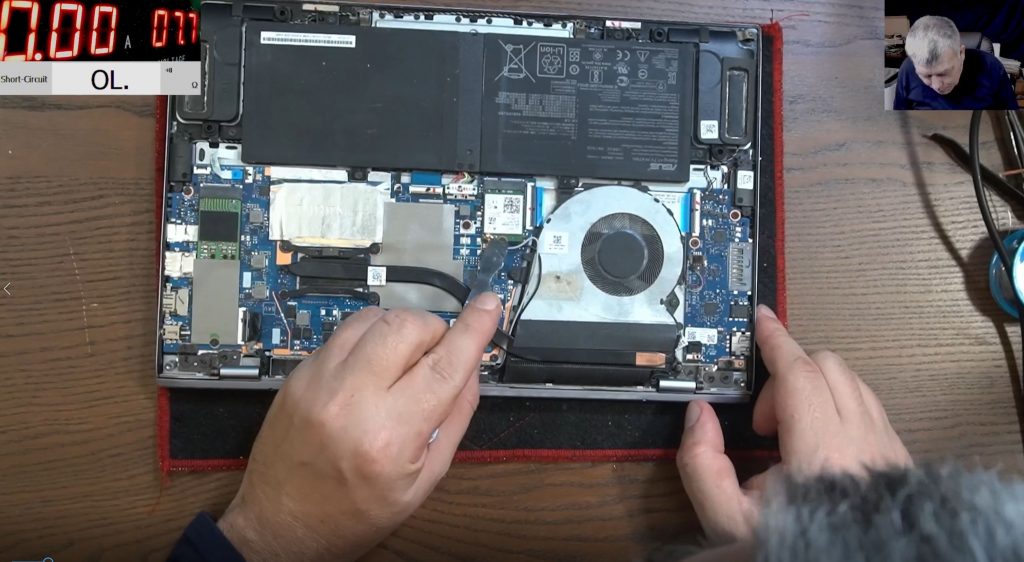
The first machine was an HP 14s-dq1008na — a 10th-generation i5, so not an old laptop. It arrived completely dead: no charging light, no LEDs, nothing from the power button. The charger tested healthy at 19.6 V, so the fault was inside the laptop.
Opening the case deepened the mystery. In Sorin’s own words: “I can’t see liquid damage anywhere.” The board looked clean, and the meter mostly agreed — 19.6 V arriving from the charging board, 19.6 V sitting on the main power rail. That is the classic trap of a liquid-damaged laptop: everything measures fine, yet nothing works. The only unhappy reading was the battery, down at 3 volts with nothing charging it — and a BIOS reset, the cheap first try, changed nothing.
One drop, straight onto the startup chip
With power present everywhere it should be, the hunt moved to the Super I/O — the startup chip that has to wake the rest of the board. And there it was: dried residue bridging between its pins. A single drop had come in from the back, through the cooling vents near the Wi-Fi card, and landed exactly on the one chip that matters.
The repair was almost an anticlimax. Charger out, battery disconnected, the Wi-Fi card lifted out of the way, and the chip cleaned with alcohol until nothing bridged the pins. On reassembly the white charging light came straight back, the fan spun up, and after the pause that follows a BIOS reset, Windows appeared on screen. Dead laptop to working laptop in a single sitting, for the price of a careful clean.
Two things from that video stick. First, this is a recurring fault — “we had a laptop a few videos ago, same issue: a drop exactly on the Super I/O.” Second, Sorin’s design complaint: the cooling holes on this HP are bare holes, no mesh. The laptop breathes through openings that will happily swallow a drop of water and deliver it to the most important square centimetre on the motherboard.
The Acer Nitro 5 and the £1,000 quote
The second machine is where the money side of laptop water damage comes in. An Acer Nitro 5 — i5, RTX graphics, 144 Hz display — had a drink spilled on it. The detail that matters: it kept working. The customer used it without any problem until the battery died, and after that it refused to charge at all.
The owner did what most people would do. Acer’s service wanted £1,000 to replace the motherboard. An independent shop looked inside and reached the same verdict — motherboard swap only — adding that they wouldn’t clean the liquid off, so the damage would be easier for the next person to find. Two professional opinions, one answer, and not a single component tested.
On the bench, the top of the board looked perfect; the only visible liquid marks were on the battery. A quick check first confirmed the main power rail wasn’t shorted — no point working hours on a board beyond saving. Then the motherboard came out, its untouched heat-sink stickers showing nobody had ever removed it before, and the underside finally told the truth: liquid damage in two areas, left by something sweet and sugary.
What the spill had actually broken
Sugar dissolves in water, so the affected areas were washed with a little water first. Under the microscope, the damaged zone gave up two shorted capacitors — one measuring 1 ohm, the other around 3 ohms. Both came off with hot air at 480 °C, the shorts vanished with them, and two donor capacitors from elsewhere on the board took their places.
Then came a twist that had nothing to do with the spill: near the memory, two inductors had been ripped off the board — ripped, not desoldered — almost certainly by whoever looked at it before, trying to isolate a short on circuits that measured perfectly healthy. The fuse and both inductors were repaired, and the 3.3-volt standby supply came back from the dead: a 10 mA idle draw on the meter, and 3 volts on the keyboard connector, where the power button lives.
One red herring remained. The voltages wobbled — the main rail swinging between 5 and 7 volts instead of 19 — until the cause turned out to be the bench charger itself: a Nitro 5 draws more than 5 amps and the bench supply could give 2.8. On the customer’s own charger the laptop powered on, stayed on, and, with the hard drive back in, loaded straight into Windows with the battery charging — 170 mA of pre-charge current showing first. The machine two professional opinions had condemned to a £1,000 board swap was repaired at component level: two capacitors, two inductors, a fuse and a proper clean. As Sorin says at the end: that’s why, with liquid damage, it’s important to take the board out and inspect it.
Spilled water on your laptop? The first hour matters
What you do straight after the spill decides how these stories end.
- Switch it off and keep it off. Hold the power button until it shuts down. Current flowing through wet residue is what turns a spill into dead silicon.
- Unplug the charger, and disconnect the battery if yours is removable. If it isn’t, powering off is the best you can do.
- Do not put it on charge — not to “test it”, not overnight. Charging a wet board does the most damage of all.
- Skip the rice. Rice does nothing about the part that actually kills laptops: the conductive, corrosive residue the drink leaves behind. A dried board with sugar bridging its components is still a faulty board.
- Don’t trust “it still works”. The Nitro 5 ran happily until its battery went flat, then never charged again. A working laptop after a spill is a laptop that hasn’t failed yet — have the board inspected and cleaned properly.
Laptop water damage repair cost: quotes vs actual repair
The Acer’s story is exactly why a water-damage quote deserves a second opinion. A replacement motherboard is £300–£600+ for the part alone — often unavailable at any price for older or premium models — which is how £1,000 invoices happen. Component-level laptop liquid damage repair fixes what the spill actually broke instead, and most common motherboard faults cost £90–£180; heavily damaged, multi-fault boards are quoted individually.
The terms are built so finding out doesn’t cost you if the news is bad. You get a written quote before any work starts. Diagnosis is free when you go ahead with the repair — the diagnostic time is absorbed into the job — and if you decline the quote, a small charge covers the inspection time. If the machine turns out to be unrepairable, no fix, no fee: you pay nothing for the work, return postage only. Completed repairs carry a 90-day warranty.
Every board is diagnosed and repaired personally by Sorin — the same hands and microscope you see in both videos — who teaches this work to nearly half a million subscribers on the Electronics Repair School channel. The workshop is in Grays, Essex, with UK-wide mail-in and 100% online booking, so a spilled drink in Aberdeen gets the same treatment as one down the road.
Spilled something on your laptop? Book a liquid damage inspection →
Post your laptop in from anywhere in the UK →
Related: how to decide whether a laptop is worth repairing at all.
Laptop water damage — common questions
Does putting a laptop in rice fix water damage?
No. Rice may pull some moisture from the air, but it does nothing about what actually kills laptops: the conductive, corrosive residue the liquid leaves on the motherboard. Both machines in this article failed because of residue — one drop’s worth and one spill’s worth — and both needed the board cleaned, not dried.
Can a laptop have water damage you can’t see?
Yes. The HP 14s in this article looked spotless inside — “I can’t see liquid damage anywhere” — yet a single drop had fallen through the cooling vents and dried across the pins of the Super I/O startup chip. Liquid damage often ends up nowhere near where the liquid went in, which is why the board has to come out for a proper inspection.
My laptop still works after a spill — has it survived?
Not necessarily. The Acer Nitro 5 here worked without any problem until its battery ran flat, then never charged again — the spill had quietly shorted capacitors on the underside of the board. If liquid went in, have the board inspected and cleaned even if everything seems fine.
How much does laptop water damage repair cost?
At component level, most common motherboard faults cost £90–£180, with heavily damaged boards quoted individually — in writing, before any work starts. A replacement board is £300–£600+ for the part alone — and the Acer’s owner was quoted £1,000 for a swap that turned out to be unnecessary.
Should I charge my laptop after spilling water on it?
No — don’t charge it and don’t keep testing it. Switch it off, unplug the charger, disconnect the battery if you can, and get the board inspected. Pushing current through wet, sugary residue is how a repairable spill becomes a dead motherboard.