The Lenovo in this article — i5, NVIDIA graphics, an older machine with a Toshiba-style barrel connector — was booked in for the most common complaint on any repair bench: a laptop not charging. Charger in, every LED dark, no reaction at all from the power button.
The diagnosis took seconds, and not one screw came out. That speed is possible because “not charging” only ever has four suspects — the charger, the charging port, the battery and the motherboard — and there is a fixed order for ruling them out that works on any Windows laptop, whatever badge is on the lid. This post climbs that ladder rung by rung, with the Lenovo as the worked example.
Why is my laptop not charging? Four suspects, one order
Every charging failure comes down to one of four things: the charger isn’t delivering power, the port isn’t passing it, the battery isn’t accepting it, or the motherboard isn’t managing it. Nothing else is on the list. People lose money on this fault because they buy parts in the wrong order — usually a battery first, because it’s the easiest thing to swap, when a battery is the least likely suspect on a machine that is completely dead.
There’s a professional reason to diagnose before quoting, too, and Sorin spells it out in the video below: a charging-port repair is priced lower than a motherboard repair, so a shop that guesses “port”, quotes for a port and then finds a board fault is left choosing between losing money and an awkward phone call. Diagnose first, price after. The same logic protects you as a customer — never pay for a part nobody has proven faulty.
Rung one: what is the charger actually putting out?
First measurement, always: the charger itself. Every barrel-type charger has its rated output printed on the label — typically 19 to 20 volts — and a multimeter across the tip tells you in seconds whether it’s delivering. On the bench the same job is done with a power supply that displays voltage and current on screen.
The supply feeding this Lenovo showed a healthy 19.6 volts. Rung cleared. If yours reads zero, or far below the label, you’ve found your fault — and a replacement charger is the one fix that is completely safe to sort out yourself. If it reads correctly, keep climbing.
Rung two: the current draw splits port from board
This is the rung most guides miss, and it’s what makes a proper diagnosis fast. A healthy motherboard is never truly off. The moment power arrives, its 3.3-volt standby supply and the Super I/O chip wake up and draw roughly 10 to 15 milliamps — before the power button is ever touched.
That tiny draw is the tell. Feed the board power and watch the current:
- Zero draw: power is not reaching the motherboard. The fault is upstream — the port or its wiring.
- A few milliamps, but no start when you press power: the board is receiving power and failing to run. That is a motherboard fault.
The Lenovo drew nothing at all. Power wasn’t arriving, so the board slid down the suspect list and the charging port moved up — all from one number on a display.
Rung three: two broken grounds, found with the case still shut
Here’s the elegant part. The metal shells of a laptop’s USB and HDMI ports sit on system ground, which means the charging path can be checked from the outside.
Probing between the charger’s ground and the USB shield on this Lenovo: no continuity. Those should be the same ground, and they weren’t — so the ground path through the charging port was broken. Then the decisive test: power on the centre pin of the charging port, ground borrowed from the HDMI shell instead — and the laptop powered straight on, pulling around 1.4 to 1.5 amps on the supply’s current display.
That one test proved four things. The plus side of the charging port was good. The motherboard was good — it runs. The charging port’s ground was broken. And, as a bonus find, the USB port’s shield had no ground either: two faults, before a single screw came out. Note what gave nothing away: the port felt rock solid, no wobble, no play. A broken wire is invisible from the outside.
Inside: the fault behind the fault
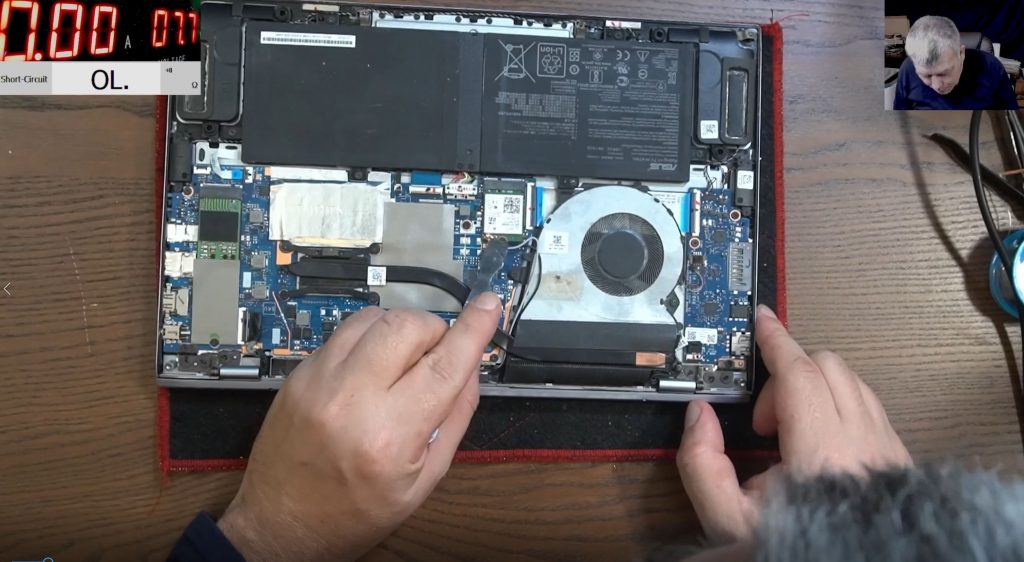
Opening the case was confirmation rather than diagnosis, and it told a story. The DVD drive screw was missing. A keyboard screw was missing. A ribbon cable for the sensor LEDs was left unplugged. And the charging port was buried in superglue. Someone had been inside this laptop before — and the customer hadn’t mentioned it. They rarely do.
Under the microscope, the actual fault: the port’s lead carries two plus wires and two ground wires, doubled up to share the current, and a ground wire had snapped. The port itself was fine. No replacement part needed — the repair was cleaning off the superglue, resoldering the broken ground, and bedding the port back down with hot glue, which unlike superglue releases with gentle heat if the machine ever needs opening again.
It didn’t end there. The hinge next to the port was broken in two places — port, hinge and covers all clamp together in that corner like a sandwich — so the hinge was rebuilt in the same session at no extra charge. Send it out with a loose hinge and the port repair is back on the bench within months.
And still the machine had one more surprise. First power-up after reassembly: fan spinning, backlight on, no picture, and when an image did appear it would freeze with strange lines — classic RAM behaviour. Sure enough, the RAM contacts carried a rusty spot of old water damage. Cleaned and reseated, the laptop finally booted into Windows.
A job booked in as “not charging” — on paper a five-minute fix — took nearly an hour and turned up four separate problems: a snapped ground wire, an ungrounded USB port, a broken hinge and water-damaged RAM contacts. It went out charged as a charging-port repair, because that is what was booked in.
What this means if your laptop is not charging when plugged in
The same ladder, scaled to what’s safe at home:
- Measure or substitute the charger. Rated voltage is on the label; a cheap multimeter or a known-good charger settles it. This is the only rung where the fix is a safe DIY purchase.
- Try mains only, battery removed (if yours is removable). Still dead? The battery was never your problem.
- Inspect the port — but don’t trust the wobble test. This Lenovo’s port felt solid and was still the fault. A firm port proves nothing either way.
- Stop before buying boards or ports on spec. Past this point the answers come from measurements: current draw, continuity, then voltage rails on the bench.
What not to do is order a battery, then a charger, then a port and hope one of them sticks. This Lenovo is exactly why: its headline fault was a single broken wire, the port everyone would have replaced was actually fine, and two more faults were invisible until the readings found them.
Past the first rung, it’s bench work — and it’s repairable
Everything above the charger test is board-level diagnosis, done here every day on any brand of Windows laptop — the ladder is identical on all of them. The process is built so a wrong guess never costs you: a written quote comes before any work starts, and diagnosis is free if you go ahead with the repair — decline the quote, and a small charge covers the inspection time. Under no fix, no fee, an unrepairable machine costs nothing but return postage.
Most common motherboard faults land at £90–£180, which matters when a replacement board runs £300–£600+ for the part alone and is often simply unavailable for an older machine like this Lenovo. Every repair carries a 90-day warranty, and every repair is done personally by Sorin — the same diagnosis he teaches to nearly half a million subscribers on the Electronics Repair School YouTube channel, including the full hour on this Lenovo above. Booking is 100% online, with UK-wide mail-in from the Grays, Essex workshop.
See how laptop motherboard repair works →
Post your laptop in from anywhere in the UK →
Related: what laptop motherboard repair costs in the UK.
Laptop not charging — common questions
How do I tell if it’s the charger or the laptop?
Measure the charger tip with a multimeter against the voltage printed on its label — most read 19 to 20 volts. The supply feeding this Lenovo showed 19.6 volts, which is precisely what moved the search inside the machine. No reading, or a wildly low one, means the charger is your fault.
Why is my laptop not charging when plugged in, even with a new charger?
Then the power is being lost between the port and the board, refused by the battery, or mismanaged by the board itself. The current draw separates them: zero draw means the port or its wiring, while a small standby draw with no start points at the motherboard.
The charging port feels solid — can it still be the fault?
Yes. This Lenovo’s port had no wobble at all, and the fault was a snapped ground wire in its lead. Broken grounds and broken wires are invisible from outside; only continuity and current measurements expose them.
Could it just be a dead battery?
Rarely, if the machine is completely dead. A failed battery normally still lets the laptop run from the mains with the battery out — a machine that shows nothing on mains power has a power-delivery fault, and a new battery will change nothing.
Does a faulty charging port always need replacing?
No. On this Lenovo the port itself was fine — the broken ground wire was resoldered and the port refitted. That’s why diagnosis comes before parts: sometimes the right repair is a wire, not a component.